Author: admin

  • 5 Church Event Follow-Up Metrics to Track (Not Just Headcount)

    5 Church Event Follow-Up Metrics to Track (Not Just Headcount)

    5 Metrics Every Church Should Track After an Event (Not Just Headcount)

    The Sunday after a big event, someone on your team almost always asks the same question: how many people came?

    It is the easiest number to count and the easiest number to put in a report. But headcount only tells you who filled a seat. It does not tell you whether a first-time guest came back, whether a family got connected, or whether the message did what you prayed it would do.

    If you are the person holding communications together at your church, the numbers you track after an event should give you something to act on. That is what church event follow up metrics are for. They turn a gathering into a next step.

    Here are five numbers worth capturing after every event, and how to use them without adding another full-time job to your week.

    Why headcount only tells part of the story

    Headcount is a useful starting point, not a finish line. A packed room with no follow-up can quietly become a room full of people who never come back. A modest turnout with strong follow-up can become the beginning of real relationships and real growth.

    The difference is what you measure next. Metrics for church events should answer three questions: Did people show up? Did they respond? Did anything change in their lives or in the life of your church?

    Keep that lens on every number below. You are not collecting data for its own sake. You are looking for the people behind the numbers and the next step each of them needs.

    The five numbers worth capturing after every gathering

    1. First-time guest capture rate

    The most valuable number after any event is not total attendance. It is how many of those people were new, and how many you can actually reach again.

    Capture rate is simple: of the first-time guests who came, how many left you a way to follow up? A phone number, an email address, a completed connection card. Anything less is a door that closed on its way out.

    Track it as a percentage, not a raw count, so you can compare a 40-person event to a 400-person event fairly. If your capture rate is low, the fix is rarely the follow-up message. It is usually the moment of collection, which all too often is a paper card at a busy exit or a QR code nobody notices.

    2. Follow-up response rate

    Once you have names, the next question is whether your follow-up actually lands.

    Response rate measures how many guests engaged with the message you sent after the event. Did they open the email, reply to the text, click the link, or sign up for the next step you invited them to?

    This is the metric that tells you whether your communication is working. If 30 people gave you their contact details and only two responded, the problem is usually timing, clarity, or channel, not the guests themselves. A message that goes out within 48 hours, from a real person, with one clear ask, almost always outperforms a polished newsletter that arrives a week later.

    3. Salvations and baptisms

    Numbers can feel impersonal until you name what you are really counting.

    Salvations and baptisms are the decisions that matter most, and they deserve to be recorded on purpose rather than remembered in passing. When you track them consistently, patterns start to appear: which events, which messages, and which invitation moments lead people to take a next step of faith.

    This is not about reducing a spiritual decision to a statistic. It is about honoring it. Tracking decisions over time helps your team see what God is doing through your events and gives you something concrete to celebrate together long after the tables are put away.

    4. Total reach across every channel

    Reach answers a different question: how many people heard about this event, not just how many attended.

    Add up the people you actually touched across email, text, social posts, your website, and print. A congregation of 300 can reach 1,200 people across a single event when every channel pulls in the same direction. That gap between attendance and reach is one of the most encouraging numbers you can bring to a leadership meeting.

    It also exposes waste. If you are spending hours on a channel that reaches almost no one, you now have the evidence to stop.

    5. Return-and-next-step rate

    The final metric covers what happens after the follow-up: did people come back?

    Return rate tracks how many first-time guests attend a second event or join a group, class, or team. Next-step rate goes one level deeper and tracks how many people moved from attending to belonging.

    This is the slowest metric to move and the one that matters most. It is also where a single missed follow-up can cost you a family. When you can see return and next-step numbers next to attendance, you stop optimizing for crowd size and start optimizing for connection.

    Turning those numbers into follow-up steps your team can run

    Numbers only help if they change what you do next. Keep the loop simple and repeatable.

    Capture at the moment, not after it. Make it easy for a guest to share their details while they are still in the room.

    Send the first follow-up within 48 hours. One clear next step beats five options.

    Assign an owner. Every new guest should have a name next to theirs on a follow-up list.

    Review the numbers together. A ten-minute post-event huddle does more than a dashboard nobody opens.

    Shofar was built for this rhythm. Each event carries its own tasks, meetings, and schedule, so your follow-up plan lives next to the event instead of in someone’s head. Email, text, and social blasts go out from one input, follow-up automations run on their own, and headcount, salvations, baptisms, and reach are tracked over time in one place. Reach your church everywhere with Shofar, and sound the call.

    A simple rhythm: pick one number and review it monthly

    If five new metrics feels like a lot, start smaller. Choose the one number that would most change how your team works, and track it for the next three events. Add a second once the first has become a habit.

    The goal is not a perfect report. The goal is to know your people well enough to invite them into the next step. Post-event follow-up is not busywork. It is discipleship with a deadline, and these numbers are simply how you keep your promises to the people who walked through your doors.

    Start this week

    After your next event, before the room is reset, write down three numbers: how many were new, how many you can reach, and how many responded. Everything else can follow. When you track the right church event follow up metrics, you stop guessing whether your communication worked and start building the follow-up that keeps people connected.

  • The Task List Disconnect: Why Church Event Planning Falls Through the Cracks


    Shofar

    Now welcoming founding churches

    The Church Communications Lab · Workflow

    The Task List Disconnect: Why Church Event Planning Falls Through the Cracks

    The Easter planning meeting ends with a dozen action
    items. Someone grabs a notebook. Someone else texts the group chat.
    Maybe one person opens Asana and types a few of them in — the ones
    they remember by the time they’re back at a laptop. Three weeks later,
    nobody is fully sure who still owes what, because the task list and the
    event it belongs to live in two different places.

    Why Task Apps Like Asana Don’t Fit the
    Way Churches Plan

    Asana, Basecamp, Trello, Monday — these are genuinely good tools.
    Millions of professional teams run their work through them every day.
    That’s not the problem.

    The problem is what they were built for: a dedicated project team,
    often with a project manager whose whole job is keeping the board
    current, working inside one tool all day. That’s not how most church
    staff operate. A communications director, a volunteer coordinator, and a
    handful of ministry leaders are juggling an event on top of everything
    else they already do — and a general-purpose task board is one more
    tab to remember to open, one more place to re-type what was just decided
    in a meeting five minutes ago.

    The result isn’t that the tool fails. It’s that nobody keeps it
    current, because keeping it current means double entry: say it in the
    meeting, then go type it somewhere else.

    The Real Problem: Tasks That Live Apart From
    the Event

    Definition

    Event-centered task management means every task,
    deadline, and meeting tied to a specific event — Easter service, a
    mission trip, a building dedication — lives inside that event’s own
    planning space, instead of scattered across a sticky-note wall, a group
    text, and a project board that only one person actually opens.

    In a generic tool, a task is just a task. It lives on a board, in a
    list, under a project name someone set up once. It doesn’t know which
    Sunday it’s for, which meeting it came out of, or who else is working on
    the same event. Connecting it back to the actual event takes a human
    remembering to do that linking by hand — a naming convention, a tag,
    a shared folder — and that convention breaks down the moment someone
    new joins or a volunteer skips a step.

    That disconnect is where things fall through the cracks. Not because
    anyone stopped caring, but because the system never actually held the
    whole picture in one place to begin with.

    Where the Chaos Actually Starts: The
    Planning Meeting

    Walk through a typical event planning cycle and the pattern is easy
    to see:

    The Planning Meeting

    The team meets, talks through the event, and makes a dozen real
    decisions — who’s handling signage, who’s confirming volunteers, who’s
    following up on the venue.

    The Re-Entry

    Someone has to translate what was said out loud into tasks somewhere
    else — a separate app, a shared doc, a sticky note — and that
    translation step is where details get dropped.

    “Wait, did we ever actually write that down
    anywhere?”

    The Drift

    A week later, the task board and the actual state of the event have
    quietly diverged. The board says one thing; reality says another,
    because updates happened in conversation, not in the tool.

    The Scramble

    Days before the event, someone finally asks “who was doing the
    thing with the volunteers?” and the answer takes longer to find than it
    should.

    None of this is a discipline problem. It’s a structural one — the
    meeting and the task list were never actually the same system.

    What Event-Centered Task
    Management Looks Like

    Shofar builds event planning around a different starting point: the
    event itself is the container, and everything that belongs to it —
    tasks, meetings, the schedule for what’s going out — lives inside
    that one planning space.

    A Task Checklist Built Into the Event

    Every event gets its own task checklist and pipeline from the start,
    so the work doesn’t have to live anywhere else to exist.

    Meetings Next to the Tasks They Create

    Planning meetings for an event sit right alongside its task list, so
    what gets decided doesn’t have to be copied into a separate app
    afterward.

    One Personal List, Every Event

    Staff and volunteers see everything they personally owe across every
    event they’re part of in a single list — not five separate
    boards.

    One Master Calendar

    Every event and every task deadline shows up on one shared calendar,
    drag-and-drop included, instead of living in a tool half the team never
    checks.

    Shofar vs. a Generic Project Tool: A
    Fair Comparison

    This isn’t a claim that Asana or Basecamp are poorly built —
    they’re excellent tools for what they’re built for: flexible,
    general-purpose project tracking for teams who live inside them all day.
    The difference is fit, not quality.

    In a generic tool, a task is created once, then
    drifts away from the meeting and the event that produced it. Keeping
    the task board accurate requires someone to treat updating it as its own
    job, on top of actually running the event.

    In Shofar, the task lives where the decision was
    made. The event is the organizing unit — not a project name typed
    into a separate system — so the checklist, the meetings, and the
    communications going out around that event are already in the same
    place by default, not by someone’s extra effort to keep them
    synced.

    In a generic tool, “what do I personally owe this
    week” means checking several boards, because tasks are organized by
    project, not by person.

    In Shofar, every staff member and volunteer has one
    personal task list that rolls up what they owe across every event
    they’re part of — the master calendar and that list are built from the
    same underlying events, not reconstructed by hand.

    A hand checking off completed items on a paper checklist

    The real test of any task system isn’t how it looks empty
    — it’s whether the list still matches reality a week later.

    A task list that lives apart from the event
    it belongs to is only ever one re-type away from being wrong.

    Less Chasing, More Ministry

    The goal was never to have a prettier task board. It was to spend
    less of the week chasing down what’s already been decided, and more of
    it actually doing the ministry the event is for.

    When the planning meeting, the task list, and the calendar all draw
    from the same event instead of three disconnected tools, there’s nothing
    left to manually keep in sync. The system already knows what the meeting
    knew.

    That’s the whole idea behind building task management around the
    event instead of around a generic project board — and it’s built that
    way for every event on your calendar, not just the big ones.


    Frequently Asked Questions

    What’s
    the difference between Shofar and Asana for churches?
    Asana is a general-purpose task board built around projects a
    dedicated team manages full-time. Shofar builds task management around
    the event itself, so the checklist, the planning meetings, and the
    communications for that event already live in the same place —
    nothing has to be manually copied between tools.

    Can tasks really be tied to a specific
    event?
    Yes — every event in Shofar has its own
    planning space with a task checklist and pipeline, meetings, and a
    schedule tab, so a task is never just floating in a generic
    list.
    Do personal
    tasks show up in one place across every event?
    Yes. Every staff member and volunteer has a personal task list
    that rolls up what they owe across every event they’re involved in, so
    there’s one place to check instead of several separate
    boards.
    Is this only
    for paid staff, or can volunteers use it too?
    Volunteers can be given access too — church teams are rarely
    all paid staff, and a task system that only works for employees misses
    most of who’s actually doing the work.


    Get Started

    Ready to see it for your church?

    Start your 14-day free trial today and see what Shofar can do for your church this Sunday.

    • 14-day free trial, card required to start
    • Hands-on support from our team while you get set up
    • Cancel anytime — no long-term contract


    Shofar

    Every channel. One plan.
    © 2026 Shofar. All rights reserved. We’ll never sell your information. Ever.

  • From One Event to an Entire Communication Strategy: How AI Helps Churches Maximize Every Ministry Moment

    From One Event to a Full Communication Strategy | Shofar
    Shofar Now welcoming founding churches
    The Church Communications Lab · Workflow

    From One Event to an Entire Communication Strategy: How AI Helps Churches Maximize Every Ministry Moment

    Community Serve Day is set. The date’s on the calendar, the sign-up sheet is ready, the t-shirts are ordered. There’s just one problem: nobody’s told anyone yet.

    Your Church Plans the Event. But Who Communicates It?

    Every church has moments that matter. A worship night. A community outreach. A discipleship class. A men’s event. A children’s ministry launch. A missions opportunity.

    Months of planning go into creating these moments. But often, the biggest challenge is not creating the event. It is making sure people know about it.

    The Traditional Church Communication Process

    A ministry leader says: “We have an event coming up.”

    Then someone has to start creating everything needed to promote it. They need:

    • A title
    • A description
    • An email
    • A subject line
    • Social media captions
    • Text reminders
    • Website copy
    • Volunteer communication

    For someone already balancing ministry responsibilities, this can become overwhelming. Communication becomes reactive instead of strategic.

    Communication becomes reactive instead of strategic.

    What If One Idea Could Become Multiple Communication Pieces?

    This is where AI changes the workflow. Instead of starting from scratch every time, AI can help churches expand one ministry idea into a complete communication plan.

    Take a simple example. A church enters:

    The starting point

    “Community Serve Day — September 6. Members will serve local organizations and invite neighbors to join.”

    From that single line, AI can help create:

    Email Communication

    Subject lines, preview text, full email copy, and a clear call to action.

    Text Messages

    Short, clear reminders written for mobile — no scrolling required.

    Social Media Content

    Announcement posts, reminder posts, countdown content, and engagement-focused captions.

    Follow-Up Communication

    Thank-you messages, celebration updates, and next-step opportunities after the event.

    Communication Should Not Be a Last-Minute Task

    Great communication is not simply telling people what is happening. Great communication helps people understand why it matters.

    When churches communicate intentionally, people are more likely to:

    AttendServeInvite othersTake their next step
    Communication is not just information. Communication creates connection.

    How Shofar Helps Churches Communicate Better

    Shofar was designed to help churches move from scattered communication to intentional communication. Instead of managing dozens of disconnected tasks, churches can create communication workflows that help them plan ahead, generate content, schedule messages, and reach people through multiple channels.

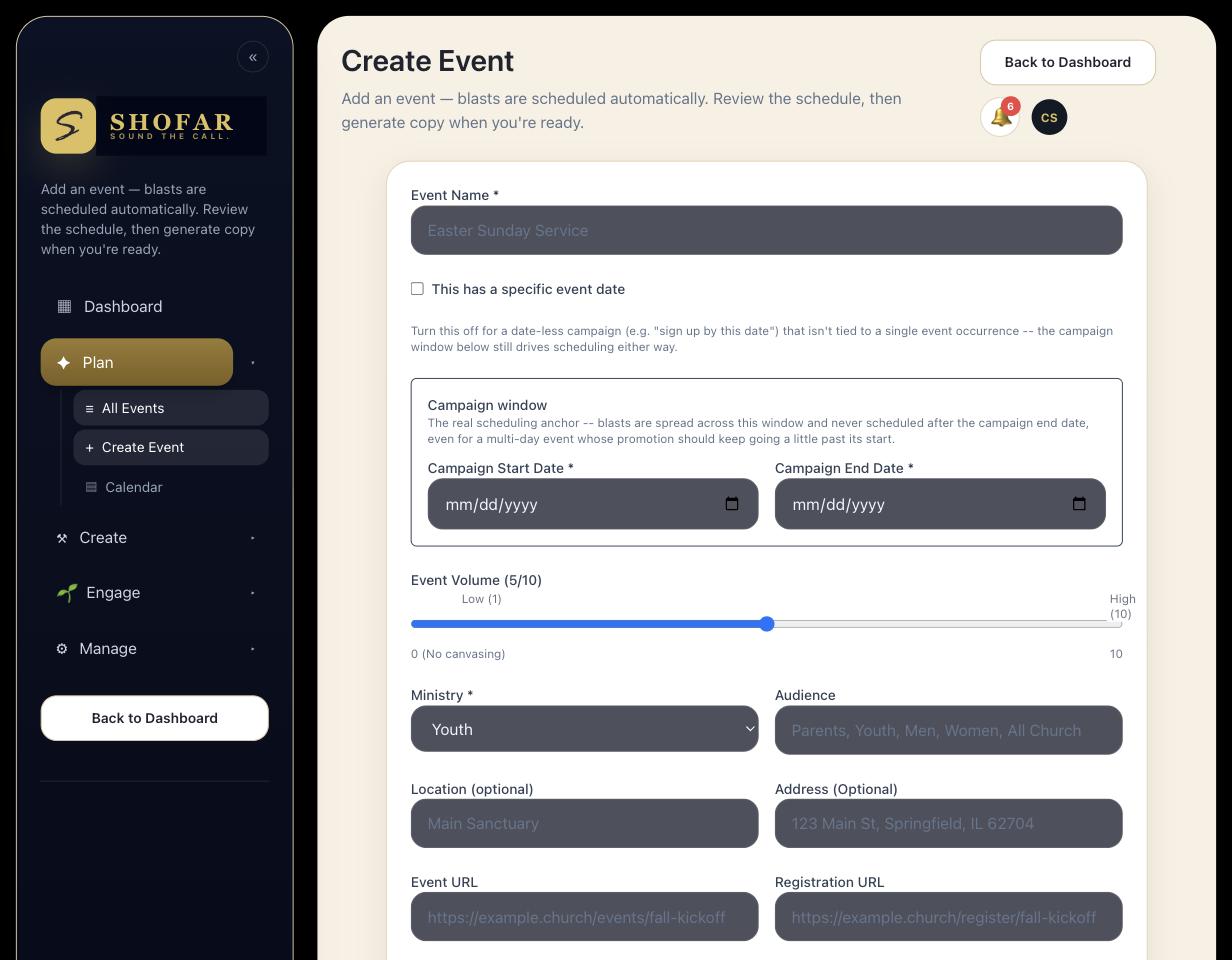
    Shofar's event form, where one event becomes a full communication
plan
    Build the event once. Shofar plans the communication around it — a real screen from inside Shofar.

    Shofar combines AI-powered content creation with communication automation, so churches can spend less time managing messages and more time ministering to people.

    The Opportunity Ahead

    Every church has moments that deserve attention. Every ministry has people who need to hear about it. AI helps churches make sure those moments do not get lost — and they’re available today.


    Frequently Asked Questions

    How much time does AI actually save when promoting a church event?
    It varies by church, but the time savings come from not starting from a blank page for every channel. Instead of writing an email, then a text, then three social posts separately, one event description becomes the starting point AI expands into each format — usually the slowest part of the process.
    Can I still edit what AI writes for my church?
    Yes. Every message AI drafts is meant to be a starting point, not a final product. The tone, personality, and voice of your church should always come from your team.
    What channels can one event’s communication cover?
    Typically email, text messaging, and social media, alongside supporting pieces like website copy and volunteer instructions — all generated from the same original event details.
    Get Started

    Ready to see it for your church?

    Start your 14-day free trial today and see what Shofar can do for your church this Sunday.

    • 14-day free trial, card required to start
    • Hands-on support from our team while you get set up
    • Cancel anytime — no long-term contract
    Shofar
    Every channel. One plan.
    © 2026 Shofar. All rights reserved. We’ll never sell your information. Ever.
  • The Future of Church Communication: Why AI-Powered Automation Is Becoming Essential

    Why AI-Powered Communication Is Essential for Churches | Shofar
    Shofar Now welcoming founding churches
    The Church Communications Lab · Strategy

    The Future of Church Communication: Why AI-Powered Automation Is Becoming Essential

    It’s 9:52 on Sunday morning. The announcement slide is still blank, the reminder text never went out, and someone just quietly asked whether the VBS graphic ever got posted. If that sentence made you wince a little, this article is for you.

    The Communication Challenge Nobody Talks About

    Most churches do not have a communications department. They have a person.

    That person may be an executive pastor, a ministry director, an administrative assistant, a worship leader, a children’s pastor, or a volunteer who simply stepped up because someone needed to handle communication.

    They were hired for one role. But somewhere along the way, communication became part of their job description. Now they are responsible for:

    • Writing emails
    • Sending text reminders
    • Creating social media posts
    • Updating the website
    • Promoting events
    • Managing registrations
    • Following up with guests
    • Communicating with volunteers
    • Creating announcements
    • Keeping everyone informed

    They are not a communications team. They are one person wearing ten different hats. And while they love the church and the mission, communication has become one more responsibility competing for their time.

    This is the reality facing many churches today.

    They are not a communications team. They are one person wearing ten different hats.

    Communication Has Changed

    The way people receive information has changed dramatically. A Sunday announcement is no longer enough. People expect communication through:

    EmailText messagesSocial mediaChurch appsWebsitesOnline communities

    A single church event now requires multiple communication touchpoints. A church outreach event, for example, might need:

    • A website description
    • Registration information
    • Email invitations
    • Reminder texts
    • Social media posts
    • Volunteer instructions
    • Follow-up communication

    The event itself may be simple. The communication around the event is not.

    The Problem Isn’t a Lack of Vision. It’s a Lack of Capacity.

    Churches are filled with incredible ministries. There are stories to tell. People to reach. Lives to impact.

    But often, the communication system cannot keep up with the mission. Not because churches do not care — because the people responsible for communication are already carrying full plates.

    The question is no longer “How do we create more content?”

    The better question is “How do we build a communication system that helps us consistently reach people?”

    The Rise of AI-Powered Church Communication

    Artificial intelligence is changing the way organizations approach communication. For churches, AI is not about replacing people. It is about removing unnecessary workload so people can focus on ministry.

    AI can help churches:

    • Create communication faster
    • Repurpose content across platforms
    • Build communication workflows
    • Personalize messages
    • Improve consistency
    • Automate follow-up
    The goal is not a more automated church. The goal is a more connected church.

    Introducing Shofar: Church Communication Automation Powered by AI

    Shofar was built for the reality most churches experience. Not every church has a communications director. Not every church has a marketing team. But every church has something worth communicating.

    Shofar helps churches turn ministry moments into complete communication strategies. Create an event once, and generate communication for multiple channels, including:

    Email campaignsText messagesSocial media contentPromotional copyFollow-up communication
    A new category, not another tool

    We call this a church communication operating system: one system that plans, drafts, and coordinates every message tied to a ministry moment — email, text, social, and beyond — so reaching people doesn’t depend on one person remembering everything.

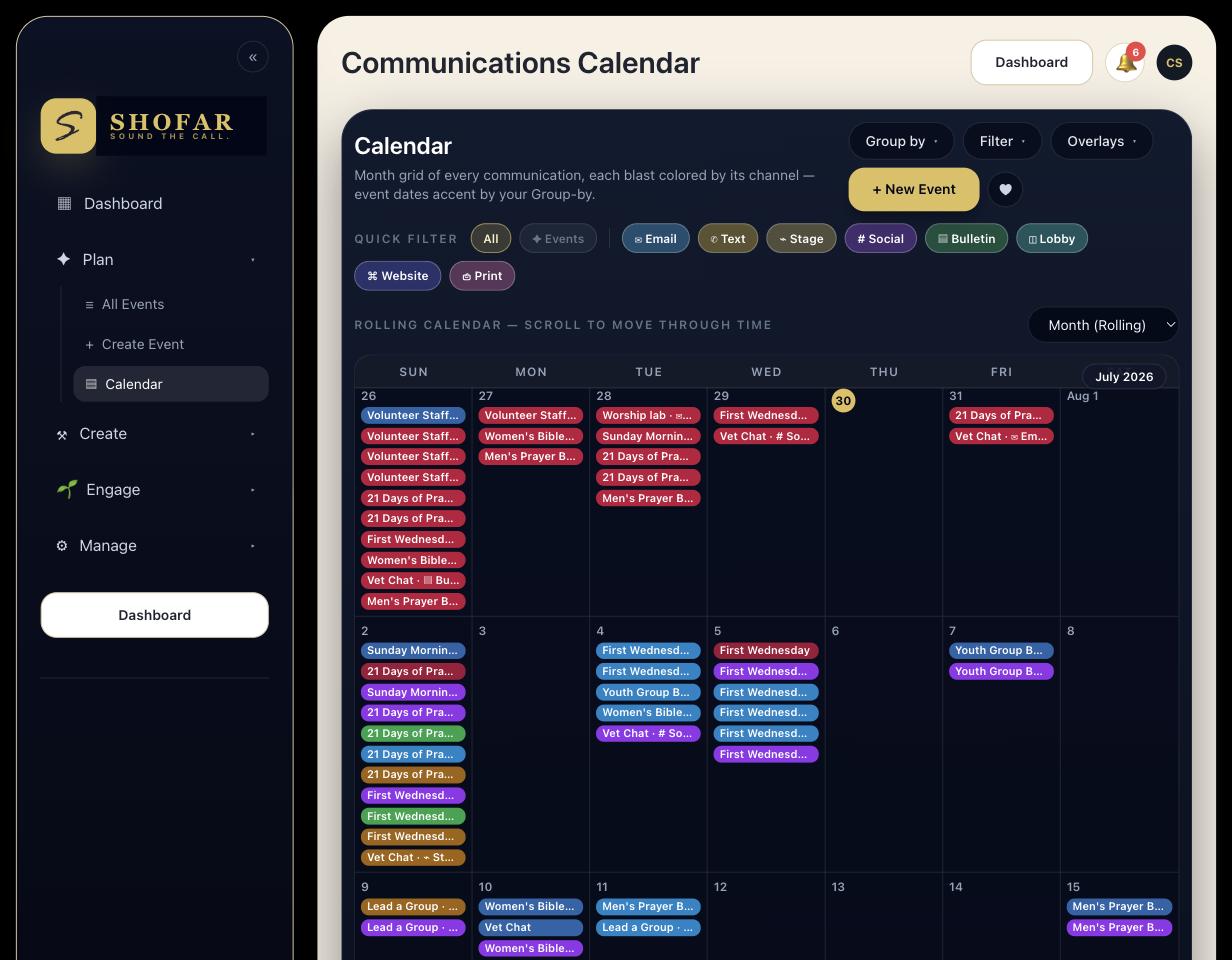
    Shofar's main calendar showing every event and communication
channel in one view
    Every event, every channel, one plan — a real screen from inside Shofar.

    Every message remains editable, because the voice of the church matters. AI helps create the communication. Church leaders provide the mission, personality, and heart.

    The Future of Church Communication

    The future of church communication is not about churches creating more announcements. It is about churches building better systems.

    AI-powered communication automation gives churches the ability to communicate with greater consistency, clarity, and intentionality.

    The message of the church has not changed. The mission has not changed. But the tools available to communicate that message are evolving — and they’re available today.


    Frequently Asked Questions

    Is AI going to replace our church’s communication team?
    No — and for most churches, there isn’t a communication team to replace in the first place. AI-powered tools like Shofar are built to remove the repetitive, time-consuming parts of communication (drafting, formatting, repurposing) so the one person or small group already doing this work can focus on the parts only a human can do: tone, relationships, and judgment calls.
    What is a “church communication operating system”?
    It’s a single system that takes one ministry moment — an event, a class, an announcement — and automatically plans and drafts the communication it needs across every channel, instead of requiring someone to build each piece by hand.
    Do I need a marketing background to use AI church communication tools?
    No. Tools built specifically for churches, like Shofar, are designed for the person who already has a full ministry role and picked up communication along the way — not for trained marketers.
    Get Started

    Ready to see it for your church?

    Start your 14-day free trial today and see what Shofar can do for your church this Sunday.

    • 14-day free trial, card required to start
    • Hands-on support from our team while you get set up
    • Cancel anytime — no long-term contract
    Shofar
    Every channel. One plan.
    © 2026 Shofar. All rights reserved. We’ll never sell your information. Ever.
  • AI Guest Follow-Up: How Churches Can Build Relationships Beyond Sunday Morning

    AI Guest Follow-Up Software for Churches | Shofar
    Shofar Now welcoming founding churches
    The Church Communications Lab · Connection

    AI Guest Follow-Up: How Churches Can Build Relationships Beyond Sunday Morning

    Maria visited your church for the first time last Sunday. She filled out a connection card, smiled through the whole service, and then — nothing. No text. No email. No follow-up. Three weeks later, she’s visiting a church down the street.

    Sunday Is Only the Beginning

    A first visit to a church can be a significant moment. Someone walks through the doors. They experience worship. They hear the message. They meet people.

    But what happens after Sunday? For many churches, this is where the biggest opportunity exists.

    The Follow-Up Challenge

    Most churches want to follow up with guests. The challenge is consistency.

    A guest fills out a connection card. Someone intends to send a message. Someone plans to reach out. But ministry leaders are busy. The week gets full. The follow-up gets delayed. And sometimes, people who were looking for connection quietly disappear.

    Relationships Require Intentional Systems

    A follow-up system does not replace personal relationships. It creates opportunities for relationships to begin.

    Automation helps churches make sure people receive timely communication while leaders focus on personal connection.

    Creating Personalized Guest Journeys

    Imagine a first-time guest experience:

    Immediately After Visiting

    A message goes out right away.

    “Thank you for worshiping with us today. We are grateful you were here.”
    A Few Days Later

    A gentle nudge toward the next step.

    “We would love to help you take your next step and get connected.”
    Later Follow-Up

    Information about groups, serving opportunities, upcoming events, and ways to connect.

    Beyond Guests: Communication Pathways for Every Person

    Churches can create customized communication journeys for more than just first-time guests:

    First-Time Guests
    New Believers
    Volunteers
    Small Group Members
    Ministry Participants
    Event Attendees

    Every person is at a different place in their journey. Communication should reflect that.

    How AI Helps Churches Create Better Connection

    AI-powered communication tools can help churches:

    • Build automated workflows
    • Create personalized messages
    • Generate communication content
    • Schedule follow-ups
    • Improve engagement over time

    The goal is not sending more messages. The goal is making sure people do not fall through the cracks.

    Shofar: Helping Churches Build Communication Systems That Care

    Shofar combines AI-generated communication with customizable automation workflows. Churches can create automated texts, email journeys, guest follow-up sequences, and ministry communication workflows.

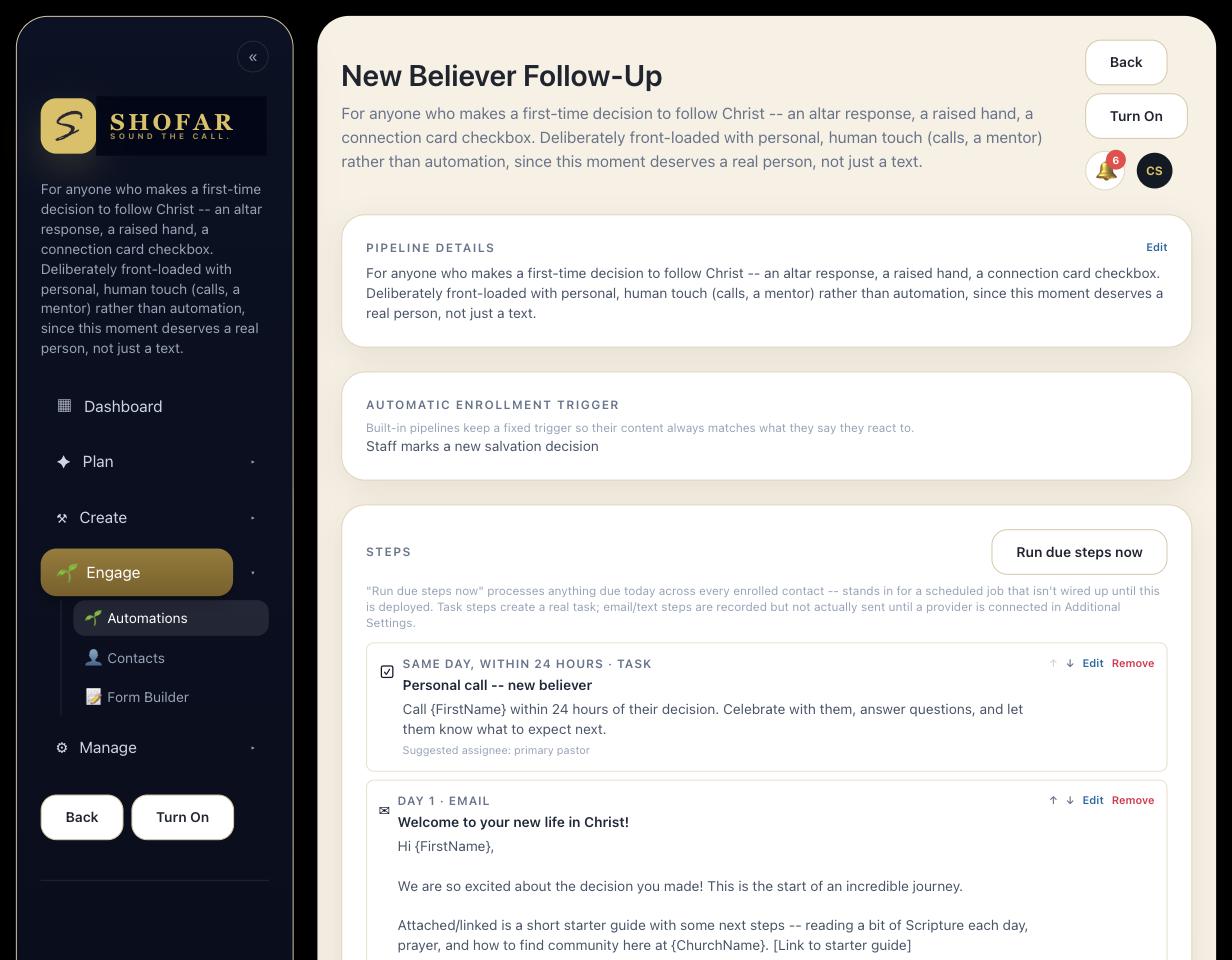
    Shofar new believer follow-up automation workflow
    A real workflow from inside Shofar — more to see once beta opens.

    Over time, Shofar helps churches refine their communication by learning what messaging connects with their people. AI handles the repetition. Church leaders provide the relationship.

    AI handles the repetition. Church leaders provide the relationship.

    The Future of Church Connection

    People do not want to feel like a number. They want to feel known.

    Technology cannot replace relationships. But the right technology can help churches create more opportunities for relationships to happen.

    The future of church communication is personal, intentional, and organized — and it’s available today.


    Frequently Asked Questions

    Why do church guest follow-up systems fail?
    Usually not because churches do not care — because follow-up depends on a busy leader remembering to send a message during an already full week. When follow-up depends on memory instead of a system, it becomes inconsistent.
    Does automated follow-up feel impersonal to guests?
    It doesn’t have to. Automation handles the timing and consistency, while the content and tone still reflect the church’s own voice. The goal is that no one falls through the cracks — not that every message feels robotic.
    Who can churches build follow-up journeys for besides first-time guests?
    New believers, new members, volunteers, small group members, and event attendees can each have their own communication journey, since every person is at a different stage and needs different information.
    Get Started

    Ready to see it for your church?

    Start your 14-day free trial today and see what Shofar can do for your church this Sunday.

    • 14-day free trial, card required to start
    • Hands-on support from our team while you get set up
    • Cancel anytime — no long-term contract
    Shofar
    Every channel. One plan.
    © 2026 Shofar. All rights reserved. We’ll never sell your information. Ever.